Play Freedoom online in your browser Works well — pair with a software-rendering port
Guide updated July 2026 · Runs via DOSBox + WebAssembly
Freedoom is a fully free, open-source replacement for the DOOM data files — same legendary gameplay, zero proprietary content. It runs with the classic DOS DOOM.EXE engine in DOSBox + WebAssembly. Hit play for instant browser-based demon slaying, no download required.
D-pad: move/turn · FIRE: shoot · USE: open doors · RUN: sprint
⌨ Keyboard — for menus & name entry
Controls — what does what
| Action | Keyboard | Mouse / touch |
|---|---|---|
| Move / turn | Arrow keys or W A S D | Move mouse to turn |
| Fire | Ctrl | Left-click |
| Open doors / switches | Space | — |
| Run | hold Shift | — |
| Strafe | Alt + arrows | Right-click |
| Weapons 1–7 | number keys | — |
| Automap | Tab | — |
| Menu / back | Esc | — |
| Sound | — | Use the Sound button under the screen to mute |
FREE This is the complete game, free. Assets BSD-licensed by the Freedoom project; runs on the freely-redistributable DOOM shareware engine.
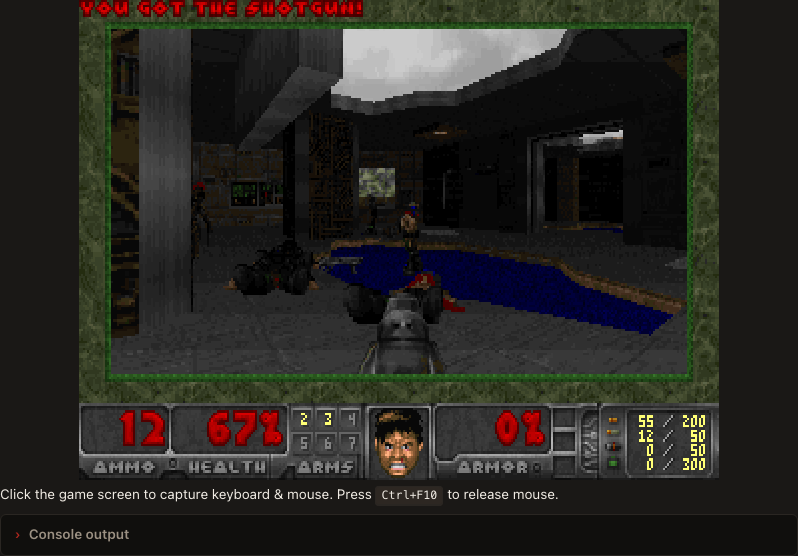
Runs in your browser tab with DOSBox + WebAssembly — nothing is uploaded. Click the screen to capture input; press Ctrl+F10 to release mouse.
Get Freedoom (free & open source)
The official, libre release
Freedoom's game data is released under a modified BSD license — you may freely copy, modify, and redistribute it, provided the license and credit travel with it. Grab the official release from the project itself:
Download Freedoom (official site) →
The download contains freedoom1.wad (Phase 1, Ultimate-Doom-style) and freedoom2.wad (Phase 2, Doom-II-style). These are WAD data files, not an executable — you also need a DOOM engine. The simplest free pairing is a small Win32 software-rendering port such as Chocolate Doom or Crispy Doom. Put the port's .EXE and a freedoomN.wad in one folder and run it on your desktop — you don't need any of that to play here, since this page already boots Freedoom for you. Everything involved — game and engine — is genuinely free and open source.
How it works & what to expect
Freedoom is not an executable. It's an IWAD: one data file holding every level, sprite, sound and piece of music. An IWAD needs a DOOM engine to run it, and this page ships one — the freely-redistributable DOOM engine running under DOSBox compiled to WebAssembly, with the Freedoom IWAD already sitting beside it. Click play and it boots in a couple of seconds. There is nothing to download, nothing to upload and nothing to configure.
Because it's a 1993-era engine doing 1993-era work, it plays at full speed on anything current. The two campaigns are separate: Phase 1 (freedoom1.wad) is four episodes of nine levels in the style of The Ultimate Doom, and Phase 2 (freedoom2.wad) is a single 30-level campaign in the style of DOOM II.
What it is — and what it isn't
Freedoom is not id Software's DOOM, and it isn't trying to copy its art. It's an original, drop-in replacement for the commercial WADs, built from scratch by volunteers so that the open-source engines have something completely free to play. That is exactly what makes it suit a browser: no shareware caveat, no licensing tightrope, no "buy the full version" at level nine.
If you specifically want id's 1993 levels, the DOOM shareware page has them. If you want a free, no-strings DOOM-style shooter to work through, Freedoom is the cleanest option there is.
Running it on your own machine
On a desktop you'd pair the same IWAD with a modern source port, and the choice matters:
- Chocolate Doom or Crispy Doom — software-rendering, tiny, and faithful to the original. The reliable pairing, and the closest thing to what this page runs.
- GZDoom and other hardware-accelerated ports — these want OpenGL 3.3 and a real GPU pipeline. Excellent natively; not something a browser sandbox can provide.
Put the port's .EXE and a Freedoom WAD in the same folder and most ports will find the IWAD on their own. None of this is needed to play here.
Frequently asked questions
Is Freedoom really free and legal to play online?
Yes, completely. Freedoom is released under a modified BSD license that explicitly allows anyone to copy, modify and redistribute it. It contains no id Software assets at all, so there are no shareware caveats and no copyright tightrope — the game data and the engine that runs it are both free software.
Can I play Freedoom unblocked at school or work?
Yes, in most setups — but it's the largest download on the site at roughly 10 MB, since a complete DOOM-format IWAD carries every level, sprite and sound. Give it a moment on a shared school connection; it is cached afterwards. Everything runs inside the browser tab under DOSBox, with nothing installed and no admin rights required. Only a block on the domain itself will stop it.
Is Freedoom the same as DOOM?
No. Freedoom is an original game built from scratch that runs on the classic DOOM engine and is compatible with DOOM-format levels and mods. It's a free replacement for id's commercial WADs — a similar feel, entirely original content. If you want the actual 1993 DOOM levels, see the DOOM shareware page.
Do I need to supply an engine or a WAD?
No. This page ships both: the freely-redistributable DOOM engine and the Freedoom IWAD, already paired, running under DOSBox in your browser. Press play and it boots. Supplying your own engine is only relevant if you want to play Freedoom on your own desktop.
What's the difference between Phase 1 and Phase 2?
Phase 1 (freedoom1.wad) is built like The Ultimate Doom — four episodes of nine levels — and works with mods made for the original DOOM. Phase 2 (freedoom2.wad) is a single 30-level campaign in the style of DOOM II, and works with DOOM II and Final Doom mods.
Which source port should I use on my own computer?
A software-rendering one: Chocolate Doom or Crispy Doom. Both are small, free and faithful to the original. Avoid GZDoom and the other hardware-accelerated ports if you're trying to run them under emulation — they need OpenGL 3.3, which a browser sandbox can't give them. Natively on a desktop, GZDoom is excellent.
Does it save my progress?
Yes, and not only from the game's own save menu. Close the tab mid-level and the next visit offers to put you back exactly where you were, because the whole emulator state is snapshotted to your browser's storage. Nothing is uploaded and there is no account — the save lives on the device you played on, which also means it does not follow you to another computer.
More you can play in your browser
Related guides
- DOOMThe 1993 original's shareware episode, playable in your browser.
- Wolfenstein 3DThe shooter that started it — shareware episode, instant play.
- Blake StoneAliens of Gold episode 1 — Wolfenstein engine, plays instantly.
- Bio MenaceApogee's run-and-gun platformer — freeware, complete.
- All games & appsEverything you can play or run here.
- Games that need nothing installedThe full list of titles that run on a locked-down school or work network.