Play Liero online — the freeware worm duel Works — the complete freeware game runs via DOSBox in your browser
Guide updated November 2026 · Runs via DOSBox + WebAssembly
Liero is the 1998 freeware game by Joosa Riekkinen that is often described as real-time Worms: two worms dig through destructible dirt and go at each other with a ninja rope and around forty weapons, with no turns and no waiting. Version 1.33, the complete game, is hosted here — click Play and it boots in your browser.
D-pad: move · CTRL / ALT / SPACE: the game's action keys · ENTER: confirm
⌨ Keyboard — for menus & name entry
Controls — what does what
| Action | Keyboard | Mouse / touch |
|---|---|---|
| Player 1 and player 2 keys | shown and changed in the game's options | — |
| Menus | Arrow keys and Enter | — |
| Menu / back | Esc | — |
| Sound | — | Use the Sound button under the screen to mute |
FREE This is the complete game, free. Released as freeware by its author, Joosa Riekkinen: the complete game.
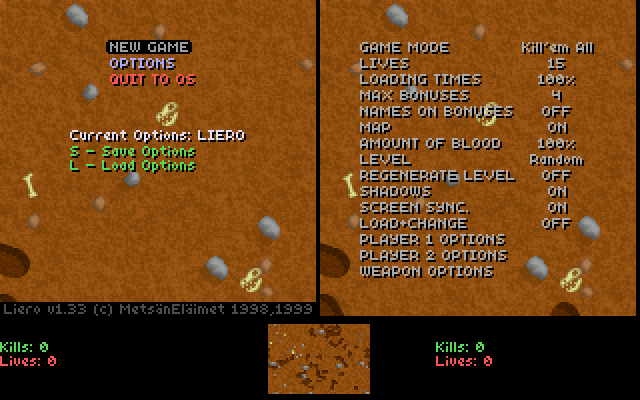
Runs in your browser tab with DOSBox + WebAssembly — nothing is uploaded. Click the screen to capture input; press Ctrl+F10 to release mouse.
Liero is freeware: its documentation states that it may be distributed to anyone and anyhow, provided its contents are unchanged. Provenance: /apps/liero/NOTICE.md.
How it works & what to expect
The original DOS game runs inside a WebAssembly build of DOSBox. It is under 400 KB and starts in a second or two; press any key at the loading text to reach the menu.
Liero is light enough to run at full speed on any device.
Playing it
Liero was made for two people sharing one keyboard, and that still works here. You can also set the second worm to be computer-controlled in the options. Each player picks five weapons before the match. The options menu shows each player's keys and lets you change them — do that first, since two sets of hands on one laptop keyboard need some planning.
The ninja rope is the skill that separates players: fire it, swing, and let go.
Why it is free
Liero is freeware. Its documentation says so directly: it may be distributed to anyone, by any means, as long as its contents are not changed. The files here are the unmodified 1.33 release.
Frequently asked questions
Is Liero really free?
Yes. Its author released it as freeware, and the included documentation permits distributing it unchanged. This is the complete game, not a demo.
Can I play alone?
Yes. Set one of the two worms to computer control in the options menu.
How do two people play on one keyboard?
Each player has their own set of keys, shown in the options menu, where you can also change them. A full-size keyboard is more comfortable than a small laptop one.
More you can play in your browser
Related guides
- Scorched EarthThe mother of all artillery games, instant play.
- CyberdogsThe 1994 top-down mission shooter for one or two players, freeware.
- One Must Fall 2097The robot fighting game, freeware.
- Wacky WheelsApogee's animal kart racer, shareware version.
- Run your own DOS gameHave the registered version or another DOS game? Drop it in the DOS player.
- Games that need nothing installedThe full list of titles that run on a locked-down school or work network.
Want a game like this on your own site?
Liero isn't ours to give away — we host it, we didn't write it. But eleven of the games here we did write from scratch, and those are free for anyone to put on their own page: one line of HTML, no account, no permission, no attribution beyond a credit line.