Play SkiFree online in your browser ▶ Play now — no Windows files needed
Guide updated July 2026 · Runs via Wine 1.7.55 (Win32) + WebAssembly
The classic SkiFree — Chris Pirih's 1991 Windows skiing game, the one with the yeti that eats you at 2000m — running right in a browser tab. No download, no install, no account. Click ▶ Play SkiFree above and you're on the slopes in seconds. SkiFree draws with plain Windows GDI graphics — no DirectX, no 3D, no networking — exactly the kind of Win32 app that runs cleanly and at full speed under Wine + WebAssembly.
Arrows: steer & speed · F: jump · Tap the slope to aim
Controls — what does what
| Action | Keyboard |
|---|---|
| Steer / speed | Arrow keys |
| Jump | F |
| Speed settings | number keys 1–9 |
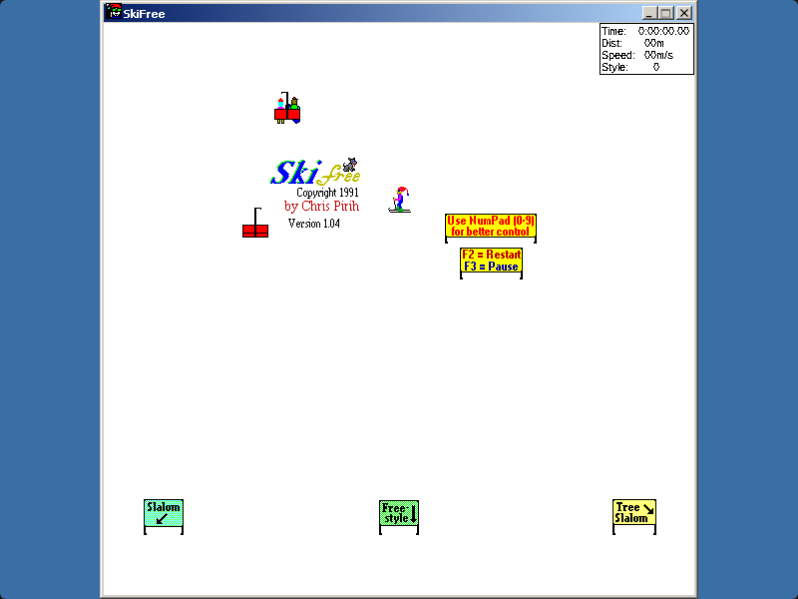
Runs in your browser tab with WebAssembly + Wine — nothing is uploaded. Click the screen to capture input; press Esc to release the mouse.
How it works & what to expect
SkiFree is about as friendly as a Windows program gets for ExeBrowser. The 32-bit version (1.04) that Chris Pirih recompiled in 2005 is a small Win32 executable that renders with ordinary GDI graphics — no DirectX, no 3D acceleration, no .NET, no online features. That's exactly the profile that runs well under Boxedwine, and the author himself notes the build "should also work on Wine." Expect smooth, full-speed skiing on any modern laptop.
The game launches automatically in the default Wine variant (32-bit Win32) using ski32.exe — Chris Pirih's own 32-bit recompile from 2005. You can also load your own copy via Load your own copy if you prefer.
The controls (and the yeti)
Click the game canvas first so it captures your input, then:
- ↓ or F — speed up / fast mode (your only hope against the yeti)
- ← → — steer; hold to carve harder
- ↑ — slow down / face uphill
- Space / number keys — tricks off jumps in freestyle
- You can also steer with the mouse — the skier follows the pointer
- Esc — release the mouse back to the page
Ski down the endless slope avoiding trees, stumps, rocks and the little dogs. Clear a course (slalom, tree slalom, or freestyle) and you reach the free-skiing stretch — where, at 2000 metres, the Abominable Snowman charges in to gobble you up. Tap into fast mode and you can outrun him for a while; the course loops and he'll hound you for the rest of your run. Outlasting the yeti is the whole legend.
Step by step
- Click ▶ Play SkiFree above — the game loads and starts automatically.
- Click the canvas to capture input.
- Steer with arrow keys or mouse and start your descent.
- Optionally: grab Chris Pirih's free 32-bit build from his official page and load it with Load your own copy instead.
Frequently asked questions
Can I play SkiFree online for free with no download?
Yes — click ▶ Play SkiFree above and you're on the slopes instantly. The game loads right in your browser via Wine + WebAssembly with no install and no account required.
Can I play SkiFree unblocked at school or work?
Almost always. SkiFree is a 38 KB program — smaller than most images on a web page — and it runs in the tab through Wine compiled to WebAssembly. There is nothing to install, nothing to download to the desktop and no admin prompt, which is exactly the profile that gets past a managed-laptop policy. A domain-level block on this site is the only thing that stops it.
Is this the real SkiFree or a remake?
It's the real, original SkiFree executable running unmodified. ExeBrowser doesn't re-create the game — it runs Chris Pirih's actual Win32 binary (ski32.exe, the free 32-bit recompile) inside an x86 emulator and Wine, drawing to a browser canvas.
How do I beat the yeti in SkiFree?
You can't truly beat him — he's the joke ending of free skiing. After 2000m he charges in and eats you. Press F (or hold ↓) for fast mode the moment he appears and weave through obstacles; skilled players survive long stretches, but the snowman always comes back.
Will SkiFree run well in the browser?
Yes. SkiFree is a tiny 2D game using basic Windows graphics — no DirectX, no 3D, no .NET — so it runs at full speed under Boxedwine. The author even notes the 32-bit build should work on Wine.
Can I load my own copy of SkiFree?
Yes. Chris Pirih makes SkiFree freely available from his official page at ski.ihoc.net. You can grab it from there and use the 'Load your own copy' option to run it here too.
More you can play in your browser
Related guides
- 3D Pinball Space CadetThe classic XP table — open-source build, instant play.
- Chip's ChallengeThe classic Windows tile puzzler.
- JezzBallTrap the bouncing balls behind walls.
- MinesweeperThe Windows mine-clearing classic.
- Solitaire (Klondike)Classic Klondike — playable right now, no download.
- Games that need nothing installedThe full list of titles that run on a locked-down school or work network.
- Compatibility guideWhat runs and what doesn't.