Play Hocus Pocus online — free shareware episode Works — press a key at the credits screen, then it runs via DOSBox
Guide updated July 2026 · Runs via DOSBox + WebAssembly
Hocus Pocus — Moonlite Software and Apogee's 1994 platformer, where an apprentice wizard blasts his way through four fantasy worlds to prove himself worthy of the Council of Wizards. Bright VGA parallax backdrops, a proper magic-bolt attack, and crystals to collect on every level. The complete shareware Episode 1 is hosted here — click Play and it boots in your browser. Hocus Pocus opens on a sound-credits screen that waits for input — press Enter (or the ENTER button on mobile) to go on into the title screen.
D-pad: move · JUMP: ctrl · FIRE: alt · ESC: menu
⌨ Keyboard — for menus & name entry
Controls — what does what
| Action | Keyboard | Mouse / touch |
|---|---|---|
| Get past the credits screen | Enter | — |
| Move | Arrow keys | — |
| Jump | Ctrl | Right-click |
| Fire magic bolt | Alt | Left-click |
| Menu / back | Esc | — |
| In-game help | F1 | — |
| Sound | — | Use the Sound button under the screen to mute |
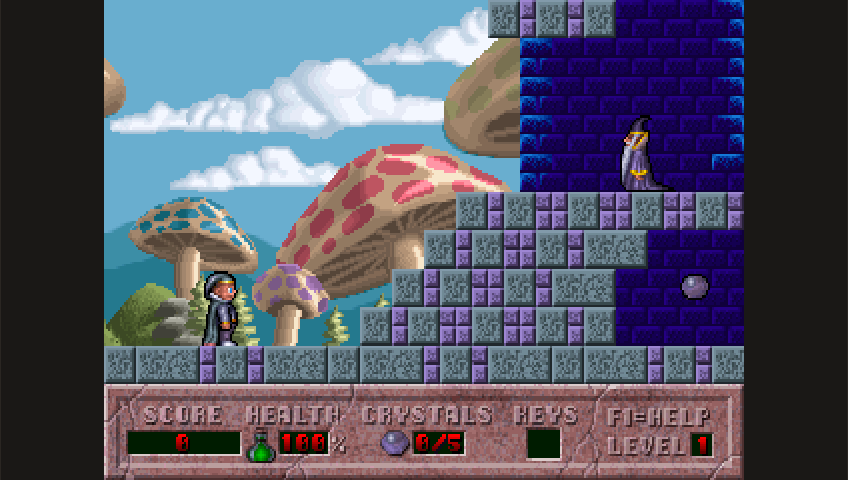
Runs in your browser tab with DOSBox + WebAssembly — nothing is uploaded. Click the screen to capture input; press Ctrl+F10 to release mouse.
Episode 1 of Hocus Pocus is Apogee's freely-distributable shareware episode. Episodes 2–4 are commercial and not hosted here. Provenance: /apps/hocus-pocus/NOTICE.md.
Get the full game
Episode 1 plays here free. Episodes 2–4 were the commercial release:
How it works & what to expect
The original 1994 DOS release, running in a WebAssembly build of DOSBox. It's a small package (under 800 KB) so it boots in a second or two. Each level wants you to find every crystal before the exit opens — the HUD tracks them as CRYSTALS 0/5 — so exploring beats rushing.
Playing tips
Your magic bolt is unlimited, so keep firing ahead of you into blind corners. Keys open the coloured doors blocking the back half of most levels, and the teleport pads are two-way — remember where you came in. Health potions are common enough that trading a little damage for a crystal is usually the right call.
Shareware episode — and the full game
Episode 1 is the free shareware episode Apogee distributed; its VENDOR.DOC explicitly permits sharing that episode and forbids distributing any registered version, so only Episode 1 is here. The complete four-episode game is still sold — look for Hocus Pocus on Steam or GOG.
Frequently asked questions
Is Hocus Pocus legal to play here?
Yes. This is the official shareware Episode 1, which Apogee distributed freely — the same basis as the Commander Keen, Cosmo and Blake Stone episodes we host. Episodes 2 to 4 are commercial and are not included.
What are the controls?
Arrow keys move, Ctrl jumps, Alt fires your magic bolt. Esc opens the menu and F1 shows in-game help. The full control table is under the game.
Why won't the exit open?
Most levels need every crystal collected first — the HUD shows your count. If the exit looks inert, there's a crystal you've missed, often behind a coloured door that needs a key.
Does my progress save?
Yes — saved games and high scores persist in this browser between visits, best-effort.
Can I play on a phone?
Yes, a touch d-pad with JUMP and FIRE buttons appears below the game on touch devices.
It opened on a wall of text and nothing happens — is it broken?
No. That is the sound-driver credits screen, and it waits for a key press. Tap the screen and press Enter, or use the ENTER button on the mobile pad, and the title screen comes up.
More you can play in your browser
Related guides
- Cosmo's Cosmic AdventureApogee platformer — shareware episode, instant play.
- Crystal CavesApogee's crystal-collecting mine platformer.
- Monster BashApogee's gothic monster-hunting platformer.
- XargonFreeware platform-adventure trilogy.
- Bio MenaceApogee run-and-gun — freeware.
- Commander KeenThe shareware platformer that started it all.
- Games that need nothing installedThe full list of titles that run on a locked-down school or work network.