Run Sumatra PDF online in your browser Works well — fast, native Win32 viewer
Guide updated July 2026 · Runs via Wine 1.7.55 (Win32) + WebAssembly
Sumatra PDF is the famously tiny, fast, open-source document reader for Windows. It opens PDFs plus a pile of other formats — ePub, MOBI, XPS, DjVu, CHM and comic-book archives (CBZ/CBR) — in a stripped-down, single-window viewer that loads almost instantly. Because it's a small, well-behaved 32-bit native Win32 program with no DirectX, no .NET and no online dependencies, it's one of the more reliable apps to run inside ExeBrowser.
That makes it a genuinely useful trick: you're on a locked-down or borrowed machine with no PDF viewer installed, and you just need to read a document. Boot Wine here, load Sumatra plus your file, and you have a real reader in the browser — and your PDF never leaves your computer, since ExeBrowser's drive lives in your own browser tab, not on a server.
FREE This is the complete game, free. GPL open-source software, free to use and redistribute.
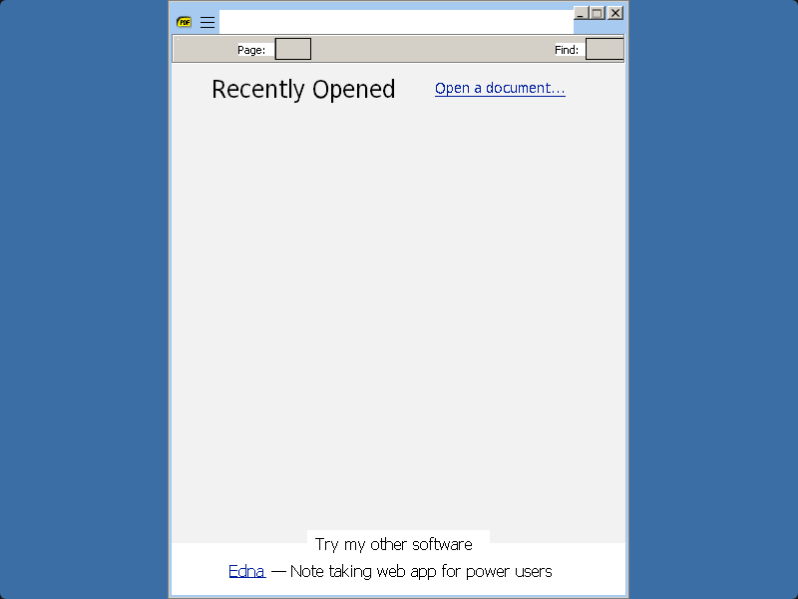
Runs in your browser tab with WebAssembly + Wine — nothing is uploaded. Click the screen to capture input; press Esc to release the mouse.
Download Sumatra PDF (open-source, GPLv3)
Sumatra PDF is free, open-source software. Grab the official 32-bit portable build (a single standalone .exe) from the official site, then upload it here alongside your document. We host a ready-to-run copy below for convenience; the original source and license files are at the project's home.
- Official Sumatra PDF download page (pick the 32-bit portable build)
- Source code & license (GitHub)
Distributed under the GPLv3 (with some BSD-licensed components). The AUTHORS, COPYING and COPYING.BSD files are included with the redistributed copy.
How it works & what to expect
Sumatra is a classic single-purpose Win32 app, which is exactly the sweet spot for Boxedwine. Page rendering, scrolling, zoom, search, the table of contents and the format support (PDF, ePub, MOBI, XPS, DjVu, CHM, CBZ, CBR) all work. Expect emulated x86 speed of roughly 10-40% of native, so a short text PDF opens quickly, while a 300-page scanned book or a graphics-heavy magazine will feel sluggish to page through. Keep documents reasonably sized for the smoothest experience.
| App | Sumatra PDF (SumatraPDF.exe) |
|---|---|
| Best Wine variant | Win32 (default) |
| Which build | The 32-bit portable build (a single .exe, no installer needed) |
| How to load | Upload SumatraPDF.exe and your document together as a folder or zip |
| Formats | PDF, ePub, MOBI, XPS, DjVu, CHM, CBZ, CBR |
Bundle your document alongside the EXE
ExeBrowser's C:\ drive is in-memory and Sumatra can only see what you hand it. The easiest path: put SumatraPDF.exe and the file you want to read into a single folder on your computer, then use the pick a folder option when you boot Wine. Once Sumatra is open, use File → Open to point it at the document. Annotations and bookmarks you create can be pulled back out with Download files written by this app.
Grab the 32-bit portable build
Boxedwine is 32-bit only, so use a 32-bit Sumatra release rather than the x64 one. The official site offers a portable version that's just a single standalone .exe — no installer to run, nothing written to a registry — which is the ideal thing to upload here. If you only have the installer, run it once on a real PC (or extract it) to get the portable SumatraPDF.exe out.
When to use it vs. your browser's built-in viewer
If you only need to glance at a standard PDF, your browser's own native viewer is faster and simpler — no emulation involved. Sumatra-in-ExeBrowser earns its keep when you need its broader format support (ePub, MOBI, DjVu, XPS, CHM, comic archives) without installing anything, want a consistent Windows reading UI, or are already using ExeBrowser for other Win32 tools and prefer one environment. It's also handy on tightly locked-down machines where you can't add software but can open a browser tab.
Frequently asked questions
Is Sumatra PDF free and legal to use here?
Yes. Sumatra PDF is open-source software released under the GPLv3 (with a few BSD-licensed components), so it's free to download, run and redistribute. We can host it because the license explicitly permits redistribution as long as the accompanying license files (AUTHORS, COPYING, COPYING.BSD) are included.
Does Sumatra PDF actually run well in the browser?
For its core job, yes. It's a small native 32-bit Win32 viewer with no DirectX or .NET, so it runs reliably under Boxedwine. Short and medium documents open quickly; very large or scan-heavy PDFs will page more slowly because everything is emulated at roughly 10-40% of native speed.
What file types can it open?
Beyond PDF, Sumatra opens ePub, MOBI, XPS, DjVu, CHM, and comic-book archives in CBZ and CBR format. That broad support is the main reason to use it in the browser rather than your browser's built-in PDF viewer.
How do I open my own PDF inside it?
Put SumatraPDF.exe and your document into one folder on your computer, choose the pick-a-folder option when you boot Wine, then use File → Open inside Sumatra. The file stays on your machine — ExeBrowser's drive lives in your browser tab and nothing is uploaded to a server.
Which build should I download — 32-bit or 64-bit?
Use the 32-bit build. The Wine engine here is 32-bit only, so the x64 Sumatra release won't run. The official 32-bit portable build is a single standalone .exe and is the easiest version to load.
More you can play in your browser
Related guides
- SumatraPDF (this page)Tiny open-source PDF & ebook reader.
- AbiWordOpen-source word processor for documents.
- GnumericLightweight open-source spreadsheet.
- NotepadThe classic plain-text editor.
- 7-ZipOpen archives to get at the files inside.
- Full compatibility guideWhat runs in the browser and what doesn't.